WooCommerce Refer a Friend PREMIUM

The original WooCommerce Referral plugin, trusted for 10+ years. Boost Sales through Word of Mouth. Our WooCommerce Refer a Friend plugin creates a simple referral program for your store. Encourage customers to refer friends and reward them with discounts, free products, or discounted subscriptions. Increase sales by turning customers into advocates.

  • Reward per new order or per sign up
  • Reward both advocate and a friend
  • Guests can have referral links
  • WooCommerce Subscription supported
  • Fraud Prevention system
  • Compatible with any theme
  • Chat and email support from the plugin developer
Trusted by 4,700+ WooCommerce stores Direct developer support Available on WooCommerce Marketplace
Feature Overview

Everything You Need in a
WooCommerce Referral Plugin

Create a complete referral program with a no-code settings panel. Increase sales and customer acquisition through word of mouth.

Referral Links & Referral Codes

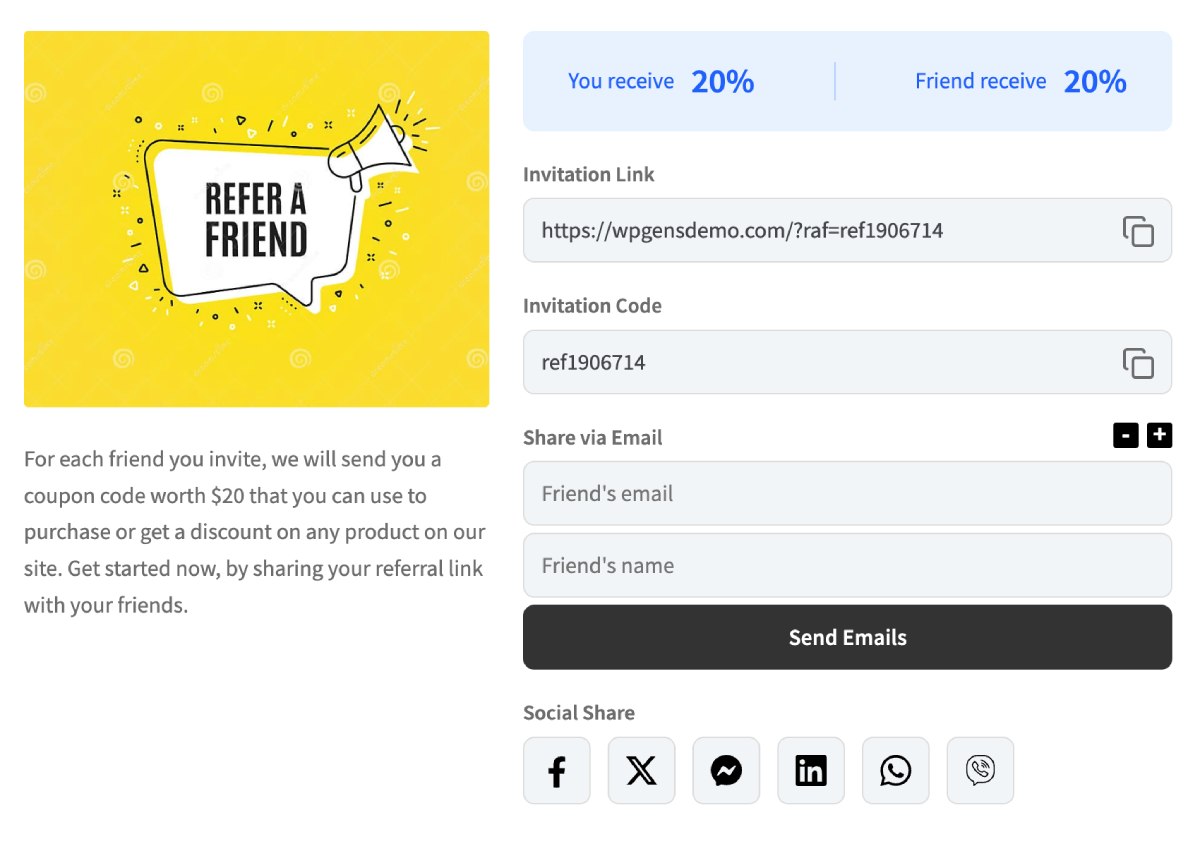
Both guests and registered users get unique referral links. Customers can also share referral coupons instead of links.

+Link
+Coupon
+Share

Reward Both Parties

Reward the advocate, the friend, or both. Set percentage, fixed, or order-based rewards with flexible coupon rules.

Advocate
Friend
$10 OFF 15% OFF

Fraud Prevention

Built-in fraud detection checks IP, email, shipping address, and phone number to prevent self-referrals and abuse.

IP Check
Email Check
Shipping Check
Phone Check

Analytics Dashboard

Track referral shares, orders, coupons generated, and top advocates. All data stored in its own table for zero speed impact.

Shares
342
Orders
89
Coupons
156

WooCommerce Subscriptions

Give customers a free renewal period when they refer someone. Coupon rewards are auto-applied on the next subscription renewal.

Refers friend Free renewal

Next renewal

Coupon auto-applied

Email & Social Sharing

Share referral links via Email, Facebook, X (Twitter), WhatsApp, and Viber. Customize email templates to match your brand.

Email
f
Facebook
X
X
W
WhatsApp
V
Viber
Referral Link or Coupon Referral

GUESTS AND REGISTERED MEMBERS

Referral Link or Coupon Referral

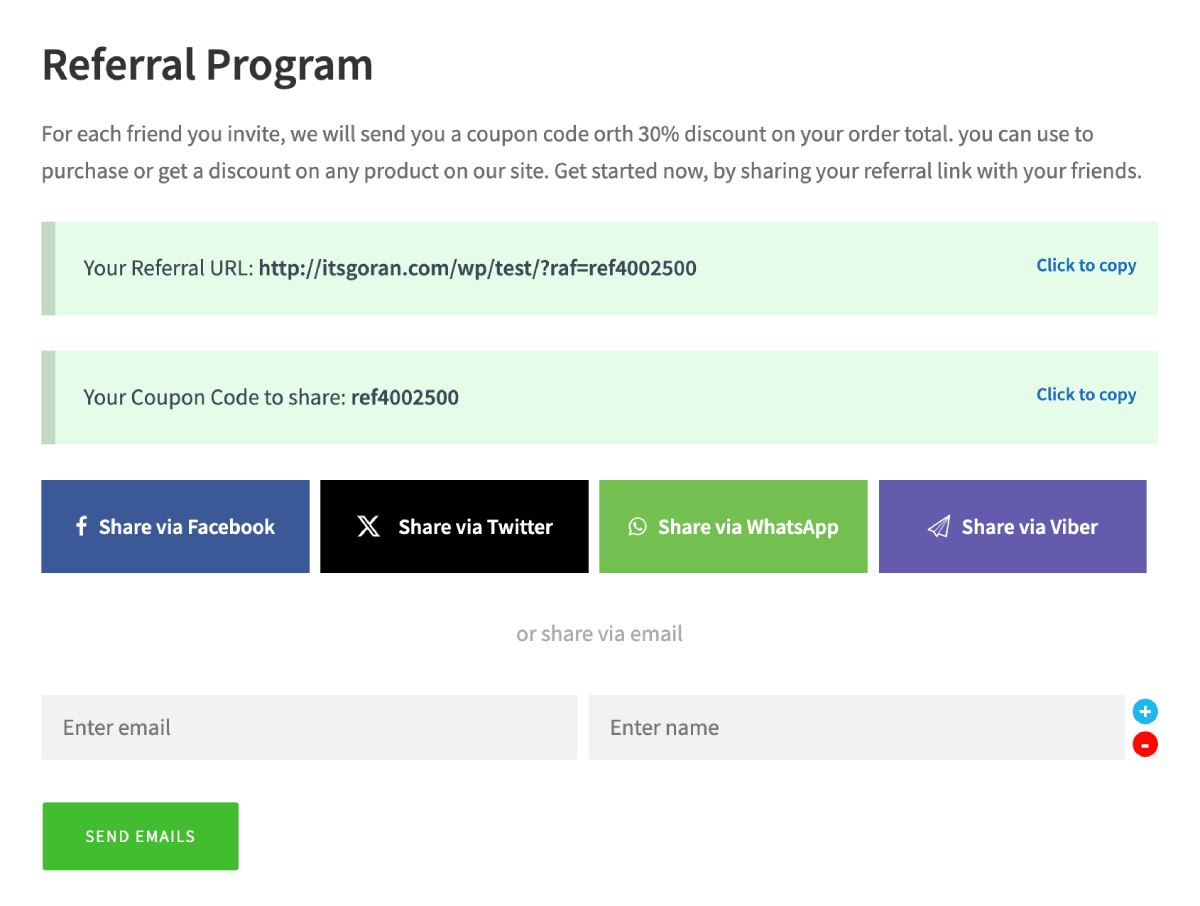
Both guests and registered users can have a referral link. This link is visible in several places:

  • "Refer a friend" tab inside the default WooCommerce "My Account" page.
  • Product Page tab (if activated).
  • Landing Page where you place one of our shortcodes.

WooCommerce Refer a Friend plugin also lets you hide the link and work only with referral coupons. In this case, the user can apply a referral coupon to the coupon field and get discount. With shortcodes, you can show all sections or some of them.

WooCommerce Refer a Friend plugin currently supports shares via Email, Facebook, X (Twitter), WhatsApp and Viber.

Multiple Looks

Templates

Multiple Looks

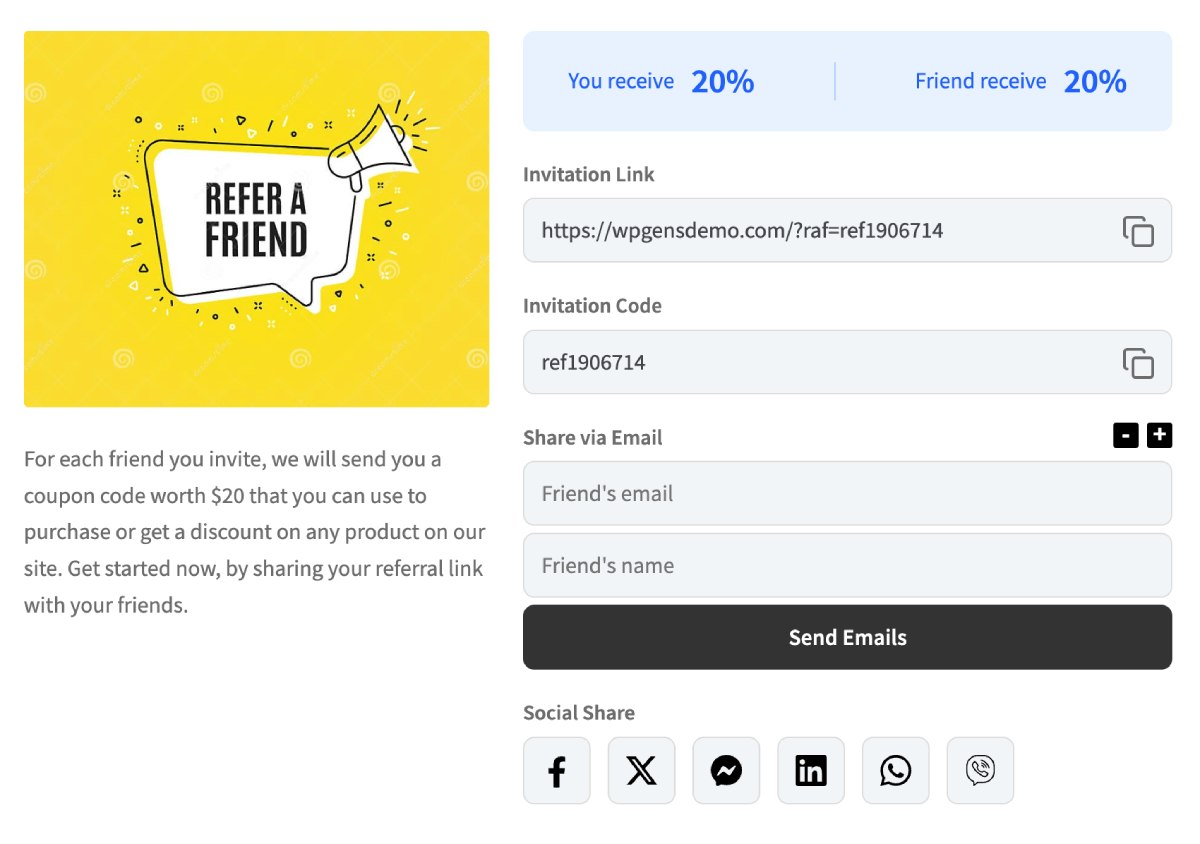
In our latest update to the WooCommerce Referral Plugin, we've introduced two default templates: Modern and Classic UI. You can fully customize these templates by copying them into your theme folder. This method is straightforward and similar to how you customize WooCommerce, allowing you to tailor the user experience to fit your brand's style.

Referral program settings

Settings

Referral program settings

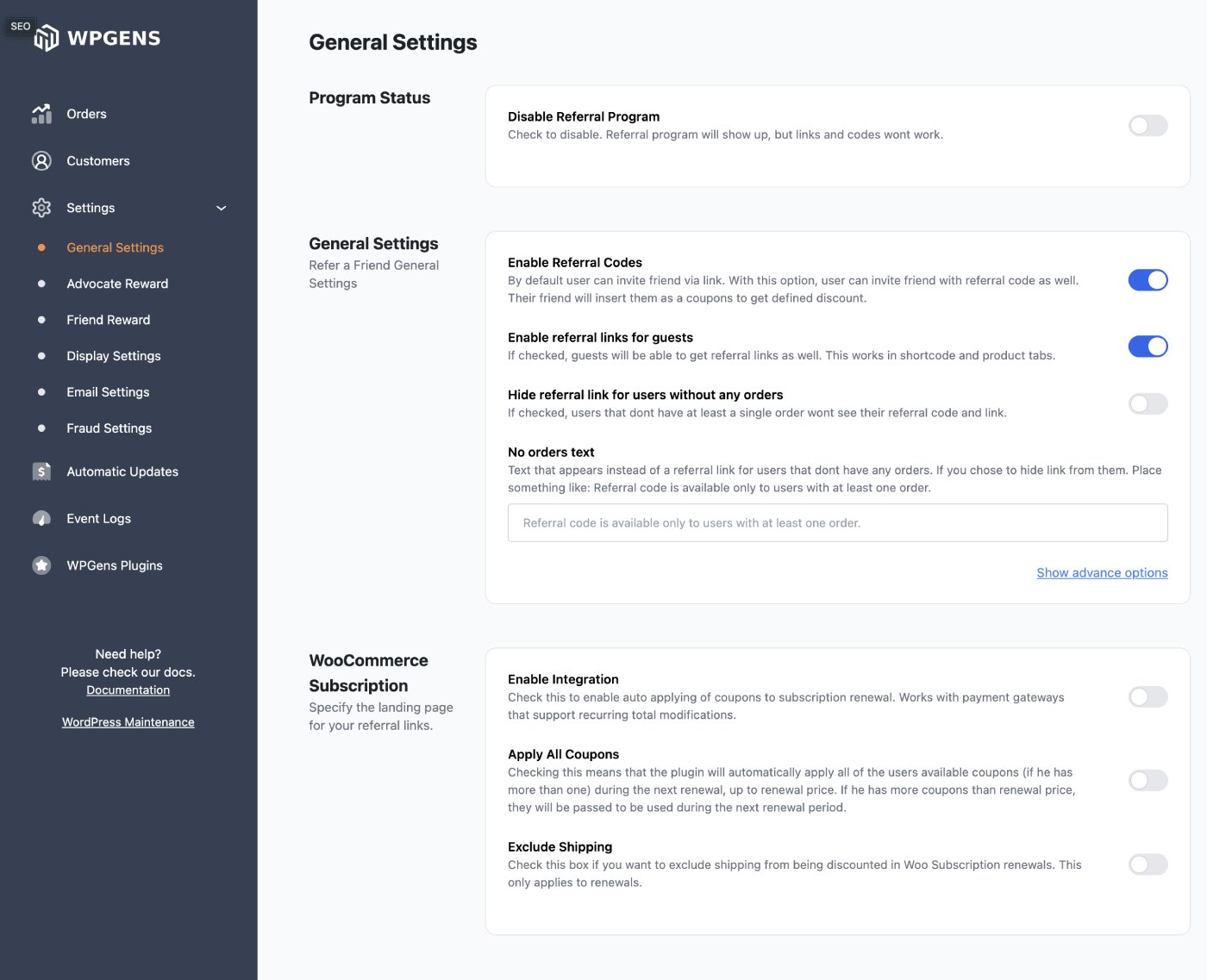
WooCommerce Refer a Friend plugins allows you to change all relevant referral program settings, such as:

  • Set the value of each coupon, which can be set to: percentage amount, fixed amount, or even % of the referred person's order.
  • Define the minimum order amount needed for the coupon to work.
  • Determine whether the coupon is category & product specific or not.
  • Compatibility with WooCommerce Subscription. Give your customers a free month (subscription period you use) when they refer someone to your site.
  • Define whether the coupon is product specific or not
Users can track referral coupons

Tracking

Users can track referral coupons

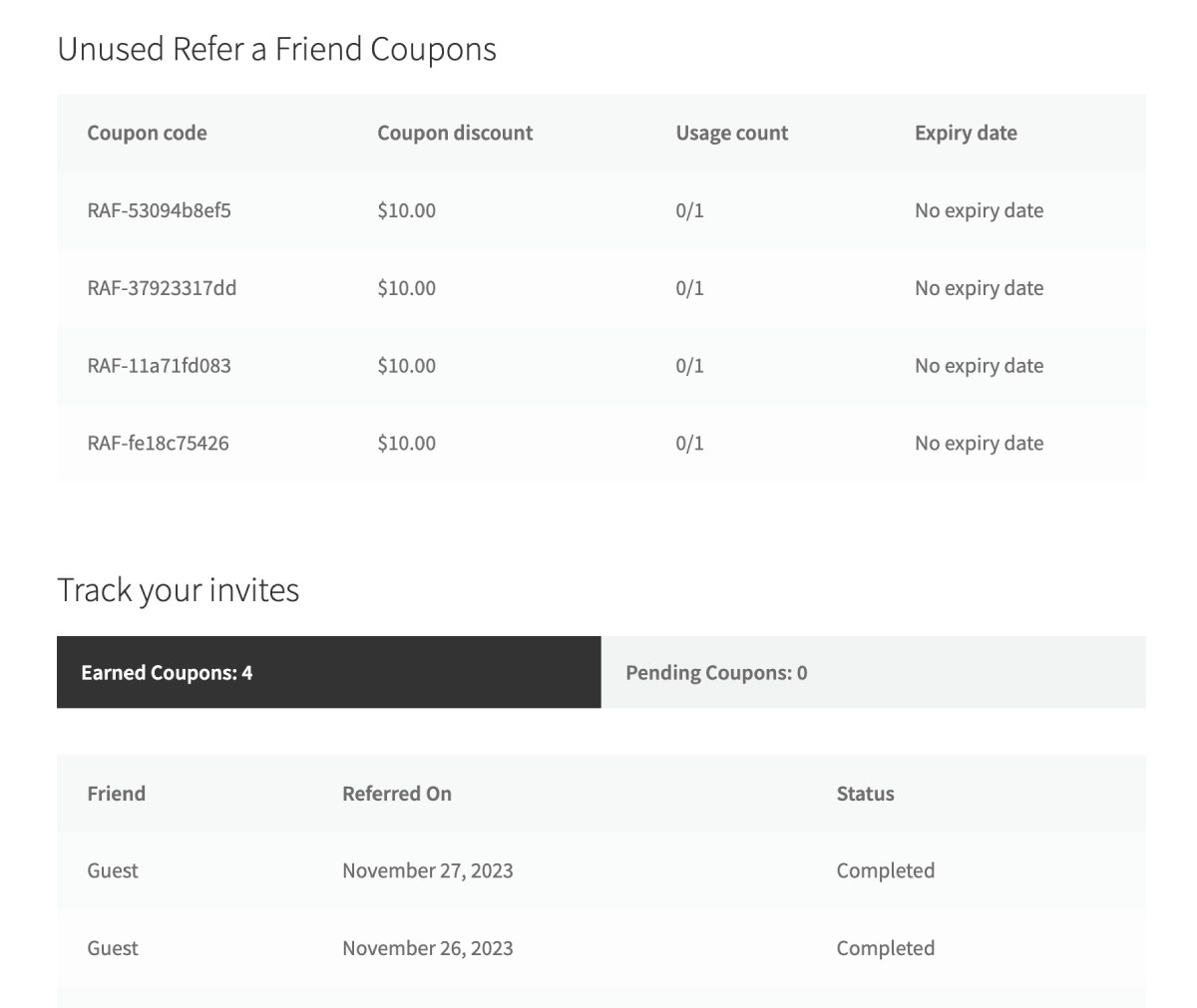
Whenever a customer receives a coupon, it will be displayed on their account page and only that individual can see it and use it. Coupons are sent to the customer via email, as well. Since coupons are issued after the order is marked as Completed, customers can track them and see the status of friend's order.

Check how the program is doing

STATISTICS

Check how the program is doing

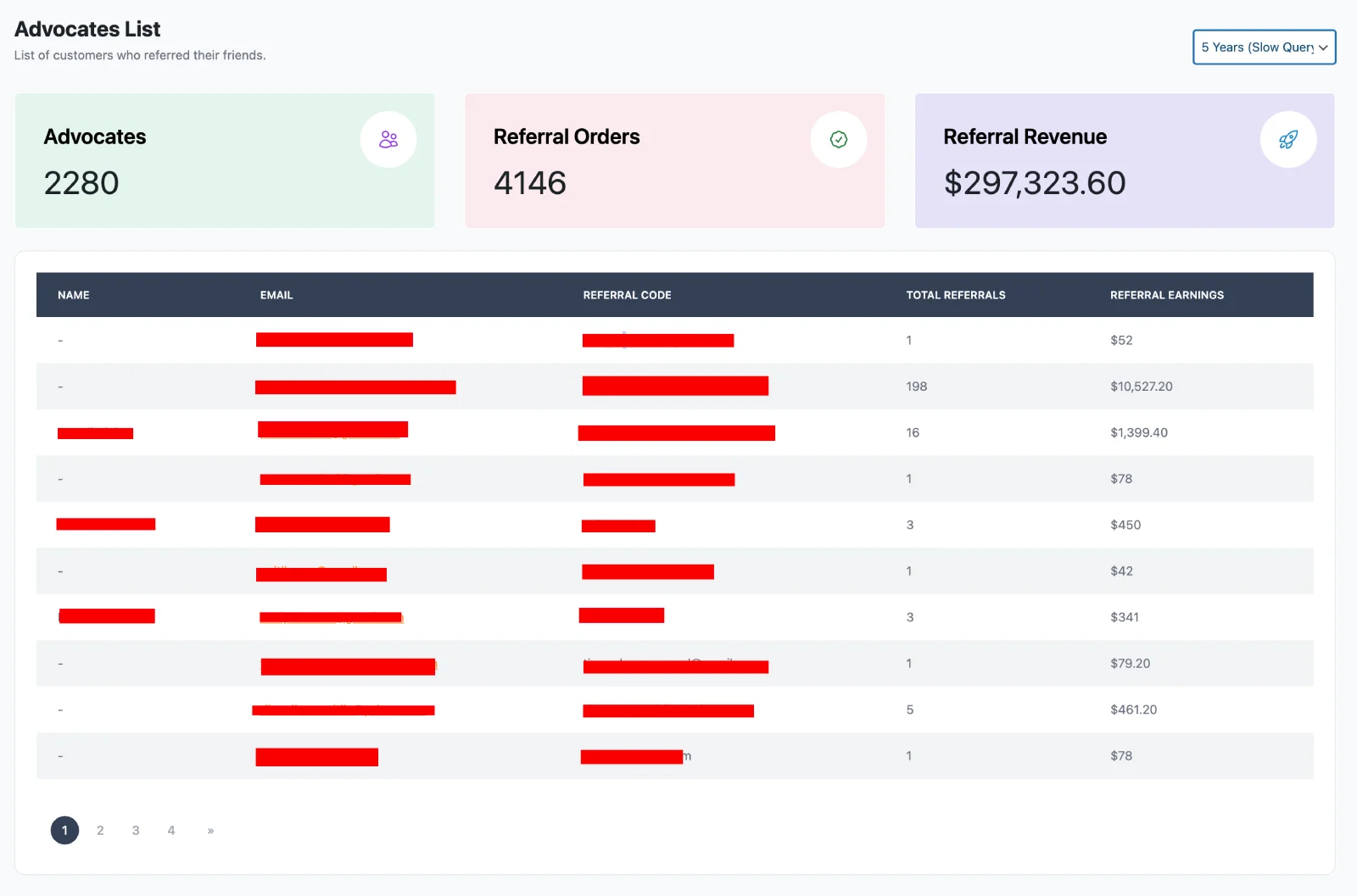
With WooCommerce Refer a Friend plugin, you can see how often referral orders are made, and also track who brought the most referrals. From the same screen, you are able to export this data to a CSV.

Fraud prevention

SECURITY

Fraud prevention

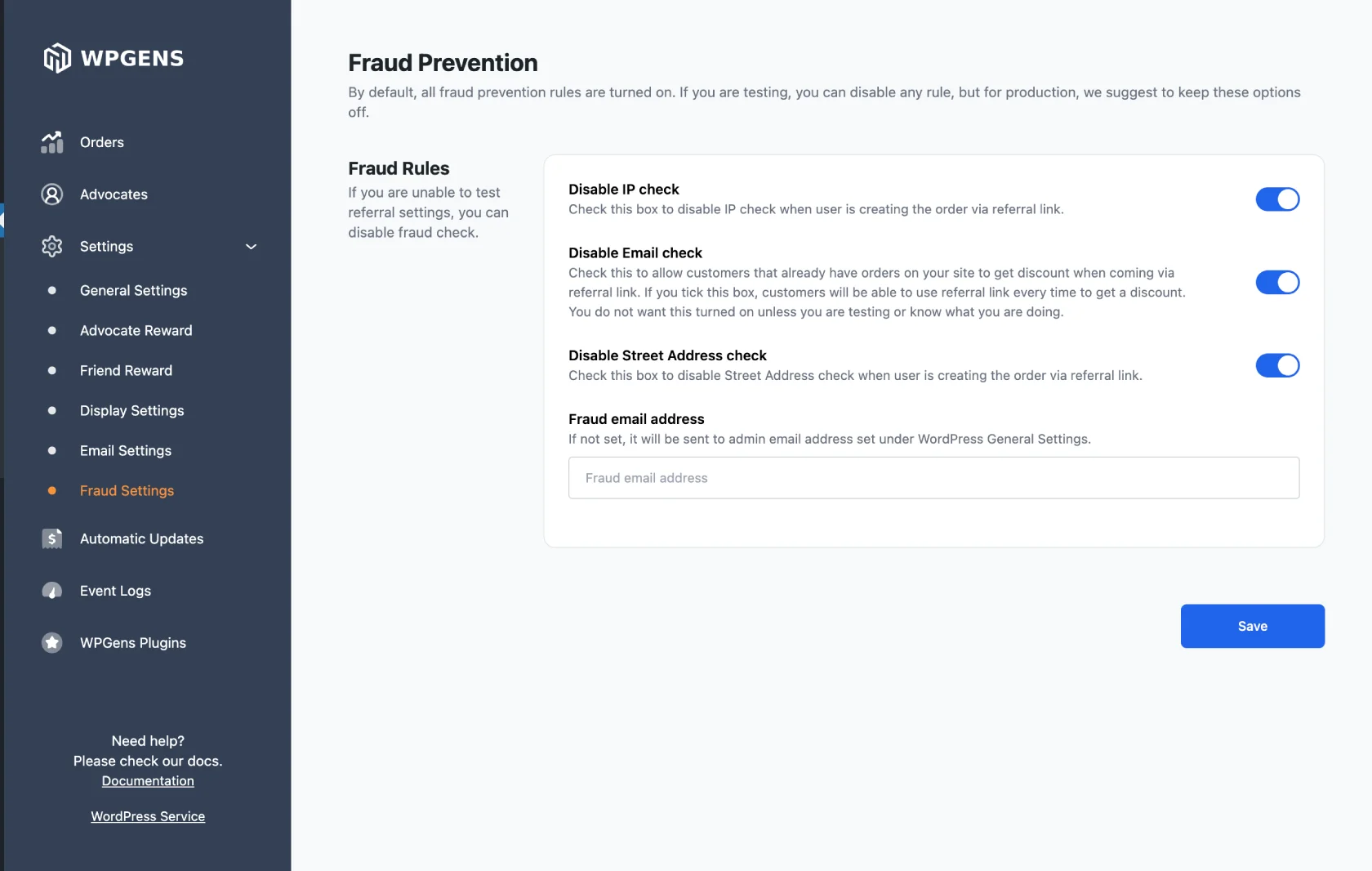
Compared to other plugins, WooCommerce Refer a Friend implements several fraud prevention systems, so that only new users or users without any orders can use referral links. Fraud is checking if a user with one of the below options has already made an order in your store. If so, they won't be eligible for a discount.

  • IP Check.
  • Shipping address Check.
  • Email Address Check.
  • Phone Number Check.

NOTE: All fraud options can be turned off under plugin settings.

Track everything

REFERRAL EVENTS

Track everything

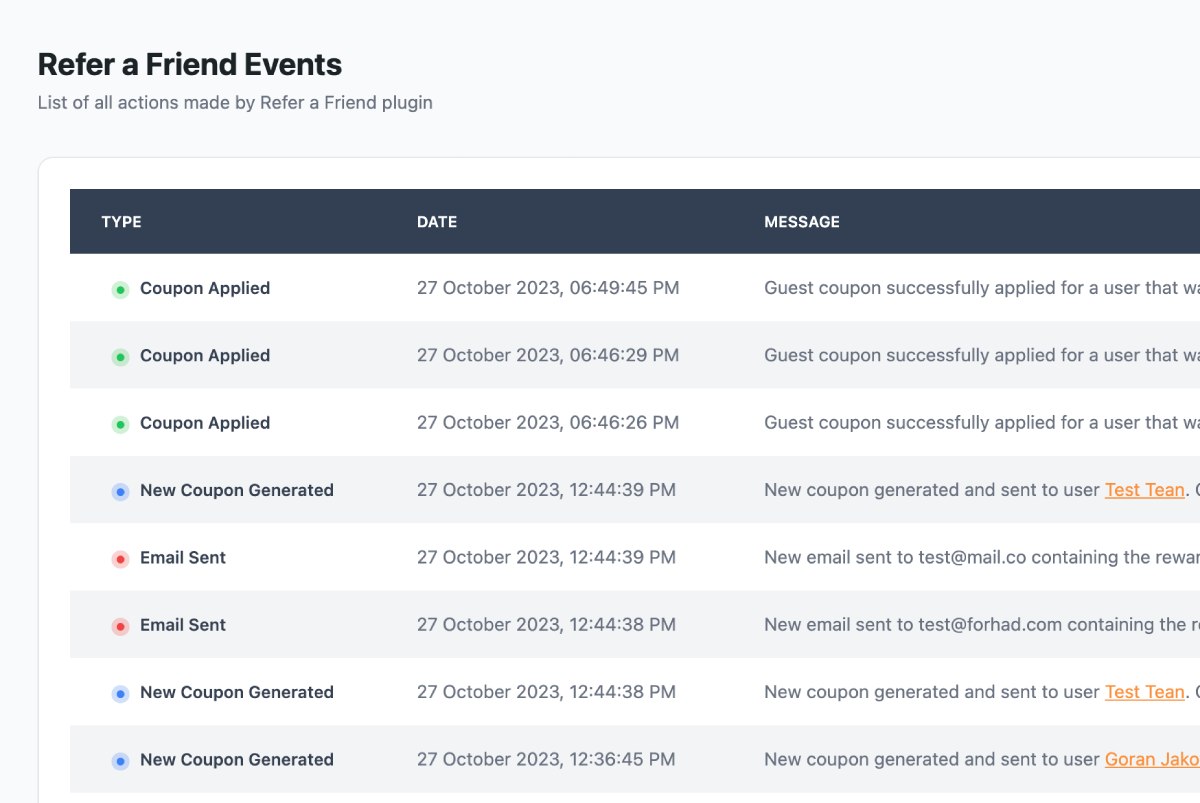
WooCommerce Refer a Friend plugin helps you track referral events. Every time one of these events happens (email share, social share, new referral order, coupon applied, coupon generated, email sent), it will be tracked and saved with all the relevant data. You can use this data to see how well your referral program is doing and determine whether it needs to be adjusted.

For example, if you see that there is a lot of referral shares, but not enough referral orders, it might be that the reward is not good enough. Or if you do not see that people are sharing their referral links, maybe you need to put it into a more visible place, or announce your referral program via email. Data is saved in its own Table so it will not have a negative effect on the site speed.

Customize Emails

BRANDING

Customize Emails

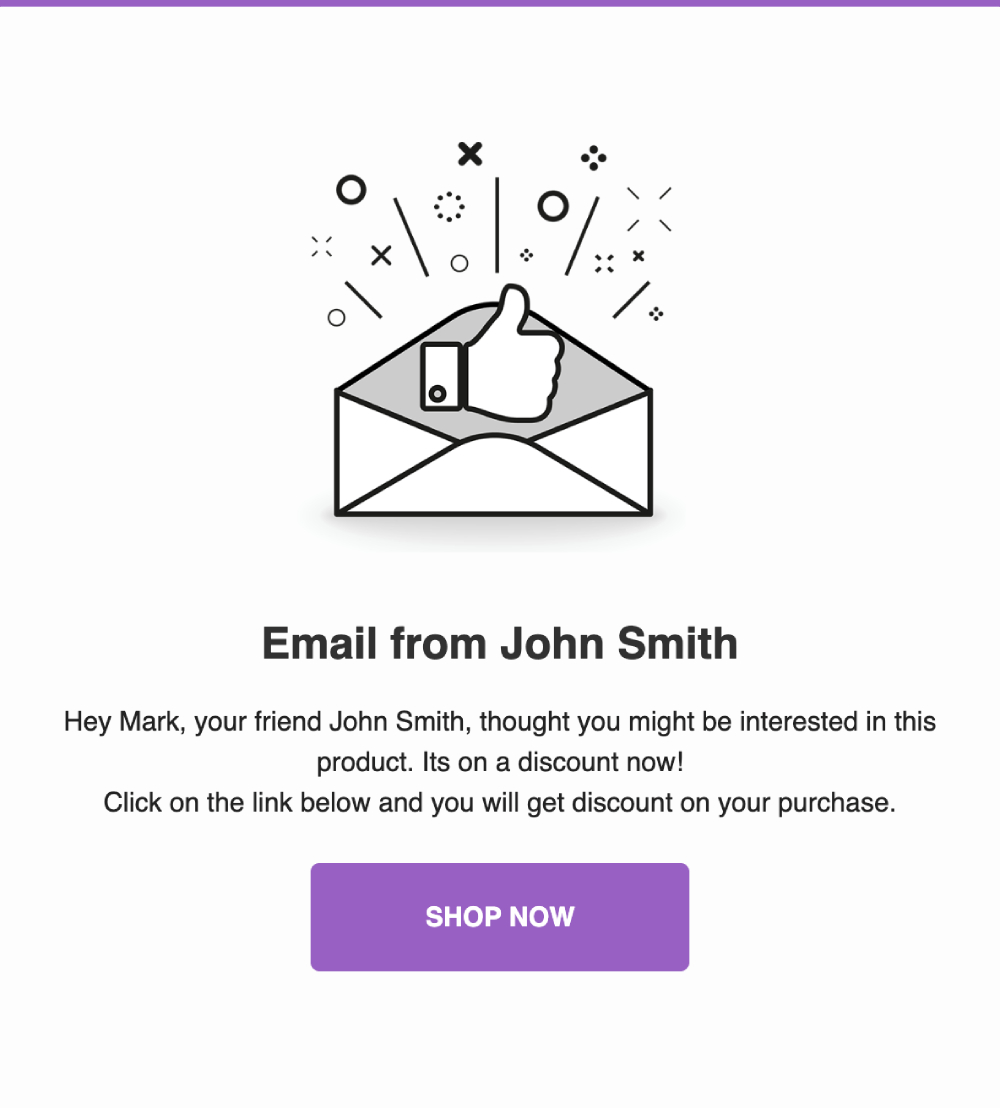
By following our documentation, you can easily customize Email Templates to fit the identity of your store brand. We have 2 templates, one that is sent when user shares their referral link, and the other that is sent when coupon code reward is issued. It is also possible to include the name of the sender in the email subject and body, which should increase the email open rate.

Made for non-developers and developers

CUSTOMIZATION

Made for non-developers and developers

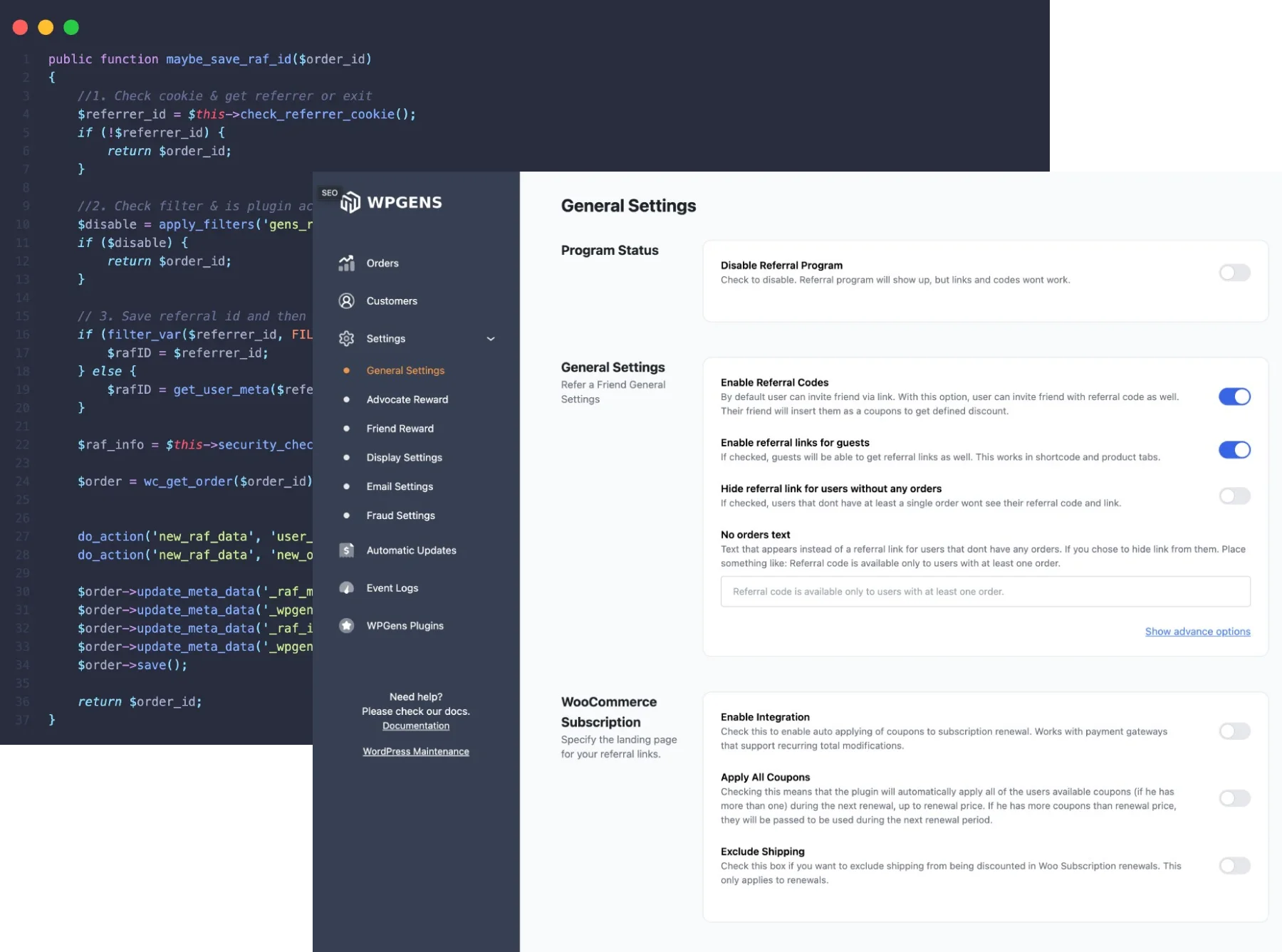
If you are not a developer, we have a user-friendly administration panel designed to easily customize the referral program according to your requirements. In case you require advanced functionalities or customizations, we provide extensive documentation.

If you are a developer, you will be glad to hear that the whole frontend is done through templates that you can copy to your theme folder and completely change the code. Just like you would do with the WooCommerce files. We also have plenty of actions and filters that you can use to change functionalities.

Multilingual Support

TRANSLATION READY

Multilingual Support

Our WooCommerce Referral plugin is fully translated into French, Deutsch, Italian, and Spanish. Additionally, you can use Loco Translate or any other WordPress translation plugin to translate it into any language you need. Enjoy seamless integration with our multilingual support.

Like every one of our plugins, WooCommerce Refer a Friend plugin is coded with best practices in mind. It is very light and will not slow down your website. There is no big setup. Simply install, activate, and choose the coupon type for your referrals. That's it! You have a referral system in place.

And with the money back guarantee, there is no reason not to try it out.

Simple & powerful

How does WooCommerce Referral program work?

WooCommerce Refer a Friend allows both registered users and guests to generate referral links. Every time they share a link and their friends make a purchase, you are rewarding them with discount coupons.

1

Share Referral Link or Referral Code

Every registered member or a guest can have a unique referral link and referral code they can share with their friends, either directly or through email and social networks.

2

Customer Makes an order

Friend who is a new customer clicks on a link and makes an order. Friend can also get a discount on their first order to motivate a purchase.

3

Coupon award is issued

After the order is completed and it passes our fraud prevention system, a coupon code is generated and sent via customized email to a person that referred the friend.

Use case scenarios

Reward only advocate

  • User A shares their referral code or link with their friend via email or any social media.
  • User B clicks on the referral link and lands on a landing page or a product page that user A shared.
  • User B buys the product immediately, pays for it -- i.e. the order is marked as Completed.
  • User A will get a coupon from this purchase (their friend will not get any rewards).

Reward both advocate and their friend

  • User A shares their referral code or link with their friend via email or any social media.
  • User B clicks on the referral link and lands on a landing page or a product page that user A shared.
  • User B adds a product to the cart and once they hit the cart page, the system will automatically give them a discount (it will apply a coupon to their order, one that you defined in the Settings).
  • User B buys the product immediately, pays for it -- i.e. the order is marked as Completed.
  • User A will get a coupon from this purchase. (both User A and User B will get the reward).

Give automatic free subscription renewal

  • User A who has an active subscription (WooCommerce subscriptions plugin) shares their referral code or link with their friend via email or any social media.
  • User B clicks on the referral link and lands on a landing page or a product page that user A shared.
  • User B purchases a subscription product and gets a discount on current purchase or next renewal, if that is set up in the Settings.
  • User A will get a coupon reward from this purchase. Coupon will be automatically applied on User A's next renewal.

Like every one of our plugins, WooCommerce Refer a Friend plugin is coded with best practices in mind. It is very light and will not slow down your website.

There is no big setup. Simply install, activate, and choose the coupon type for your referrals. That's it! You have a referral system in place.

Trusted by Store Owners

What Our Customers Say

4.8 average across all reviews

"Amazing Refer a friend plugin -- highly flexible with outstanding customer support!"

Jantje
Verified via Trustpilot

"I tried all the RAF plugins. Goran not only replied immediately to my support request, he replied multiple times until we sorted out the problem -- even on Christmas Eve! Best customer experience I've ever had with any software company."

pooley67
Verified via WordPress.org

"Hands-down the best technical support I've ever had with 10+ years experience working with e-commerce software. Got a response within an hour even late night at weekends."

Michel
Verified via Trustpilot

Simple Pricing

Choose Your Licence

Yearly Lifetime

Billed annually until canceled. Cancel anytime from your account.

1 Site

Perfect for a single store

$59 /year
  • All features included
  • 1 year of updates & support
  • 14-day money-back guarantee
Buy Now
MOST POPULAR

Up to 3 Sites

For agencies & multiple stores

$99 /year
  • All features included
  • 1 year of updates & support
  • 14-day money-back guarantee
Buy Now

Unlimited Sites

For agencies & multiple stores

$199 /year
  • All features included
  • 1 year of updates & support
  • 14-day money-back guarantee
Buy Now
100% Money Back Guarantee

100% No-Risk Money Back Guarantee

You are fully protected by our 100% Money Back Guarantee. If you are not completely satisfied within 14 days of purchase, we will happily issue a full refund -- no questions asked, no hoops to jump through.

Current version: 2.12.0 | Last updated: Feb 2026 | Compatible with WooCommerce 8.x+

Frequently Asked Questions

Can't find the answer you're looking for? Reach out to our customer support team.

Is buying a plugin a one-time purchase?
You are free to use the purchased plugin indefinitely. When you buy a plugin license, you gain access to updates and support for one year. To continue receiving support and updates after the initial year, you'll need to renew the license.
What happens if licence expires?
If your license expires, you may continue using the plugin on your site indefinitely. However, please note that you won't be able to access the file for download or receive any further support or updates for the plugin.
How do you provide support?
For Free plugins, we offer support via WordPress.org. For PREMIUM plugins, such as WooCommerce Refer a Friend Premium plugin, we offer support via email or chat. We are proud to say that our response rate is less than a few hours 90% of the time, but all questions are guaranteed to be answered within 1-2 business days.
Does WooCommerce Refer a Friend plugin support WooCommerce Subscription?
Yes. We fully support WooCommerce subscriptions. You can set to have a coupon reward automatically apply during customers auto renewals.
Does it support WooCommerce Points and Rewards?
Yes. You have an option to give points instead of coupon rewards to customers referring their friends. This is set under WooCommerce Points and Rewards Settings after you activate our plugin.
How often do you update plugins?
We update plugins whenever there is a new feature introduced or if there is a bug fix. We try to push new features every month, which is frequent for WooCommerce plugins. View the changelog on the product page to check the latest version.
Do you offer refunds?
Yes. We offer refunds within 14 days money-back guarantee whatever the reason. So if you find that Woo referral plugin does not fit your needs, reach out to us and we will issue a refund.
Still have questions? Contact our support team

Ready to grow your store with referrals?

Join 4,700+ WooCommerce stores using Refer a Friend. 14-day money-back guarantee, no questions asked.

Buy Now
$99 /year
Buy Now

Select Plan

1 Site Perfect for a single store
$59
Most Popular
Up to 3 Sites For agencies & multiple stores
$99
Unlimited Sites For agencies & multiple stores
$199
Lifetime Pay once, updates forever
$139