WooCommerce Refer a Friend supports 2 types of shortcodes you can use to show a referral link to your customers:
- Simple shortcode
- Advanced shortcode
Simple shortcode
The simple shortcode: [WOO_GENS_RAF] will show just a referral link for users who are logged in. Use the URL parameter in the shortcode to link to some other page – by default, it’s set to the homepage.
Advanced Shortcode
The advanced shortcode comes with social icons and email shareability:
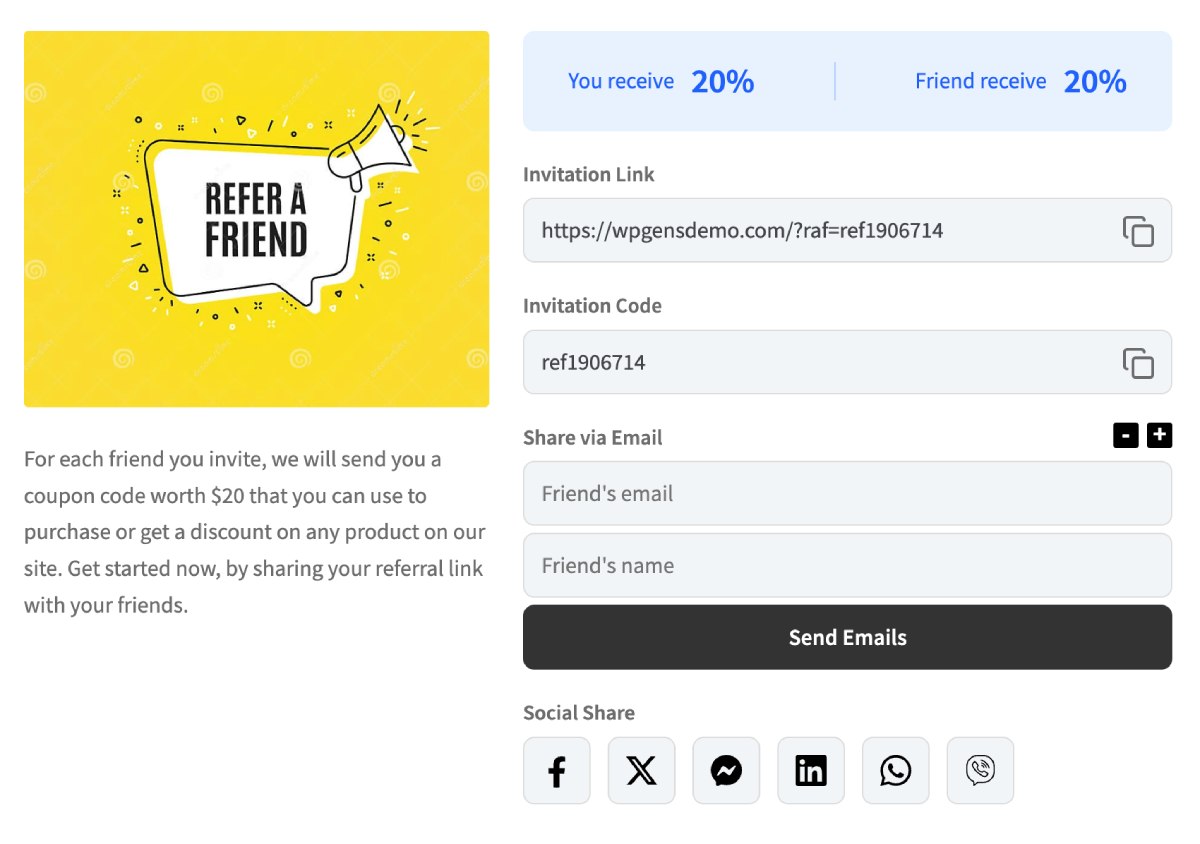
This is the shortcode you can use:
[WOO_GENS_RAF_ADVANCE guest_text='Please login <a href="login_url">here</a> to access your referral link.']In general, you want to create a landing page that will have a piece of text explaining the benefits of the referral system, then include a shortcode below it. The shortcode will show only for logged-in users, while for guests, you can define which message to show as a parameter – as you can see in the shortcode example above. You can pass url=” parameter if you want referral link to land on specific page.
Full Shortcode to replicate My Account Page
Some custom themes do not use WooCommerce built-in filters, so sometimes you need to add a custom tab with the content. In that case, Refer a friend tab on the My account page will not show and you need to use [WOO_GENS_RAF_FULL] shortcode to replicate the My Account page.
Contact Form 7 Shortcode
Check this article that explains the usage of Contact Form 7.