If you use Klaviyo for your email marketing, the Points & Rewards plugin makes it easy to sync loyalty data so you can personalize your campaigns based on points activity.
With this integration, you can:
- Sync point balances and updates to Klaviyo
- Create customer segments based on loyalty behavior
- Trigger automated flows like expiry warnings or VIP offers
Klaviyo Integration Setup
To enable the integration:
- Go to Points & Rewards > Integrations
- Enable the Klaviyo toggle
- Enter your Klaviyo Private API Key
- You can find this in your Klaviyo dashboard under Account > Settings > API Keys
- Save your settings
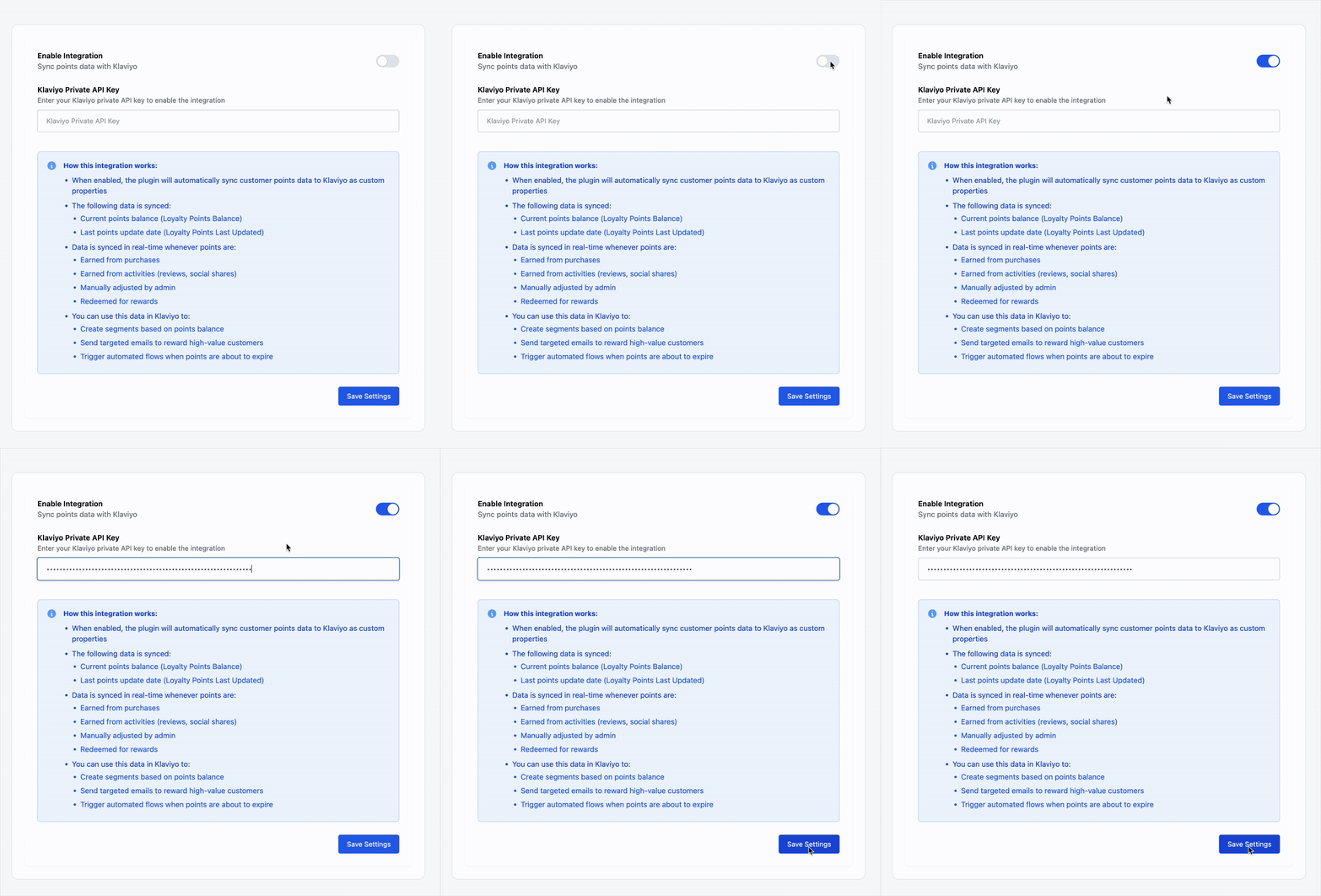
Once connected, the plugin will begin syncing loyalty data to Klaviyo in real-time.
Syncing Points to Klaviyo
When the integration is active, the following customer data is synced automatically as custom properties in Klaviyo:
- Loyalty Points Balance – current points total
Property name: Loyalty Points Balance - Loyalty Points Last Updated – the date of the most recent points activity
Property name: Loyalty Points Last Updated
This sync occurs whenever:
- A customer earns points (from orders or actions)
- An admin manually updates their points
- A customer redeems a reward
These fields are tied to the customer’s email address, so it’s important that customers check out using the same email used in their Klaviyo profile.